
Create a run.
See where your email really lands.
Send one real email to controlled provider inboxes. See Inbox, Promotions, Spam, and Missing results before your campaign reaches prospects.
Last reviewed 2026-08-20
Test before every send.
Send the tracked email.
Open the public or authenticated report.
Fix with evidence.
See the provider outcome, make one defensible change, and retest the same sending path.
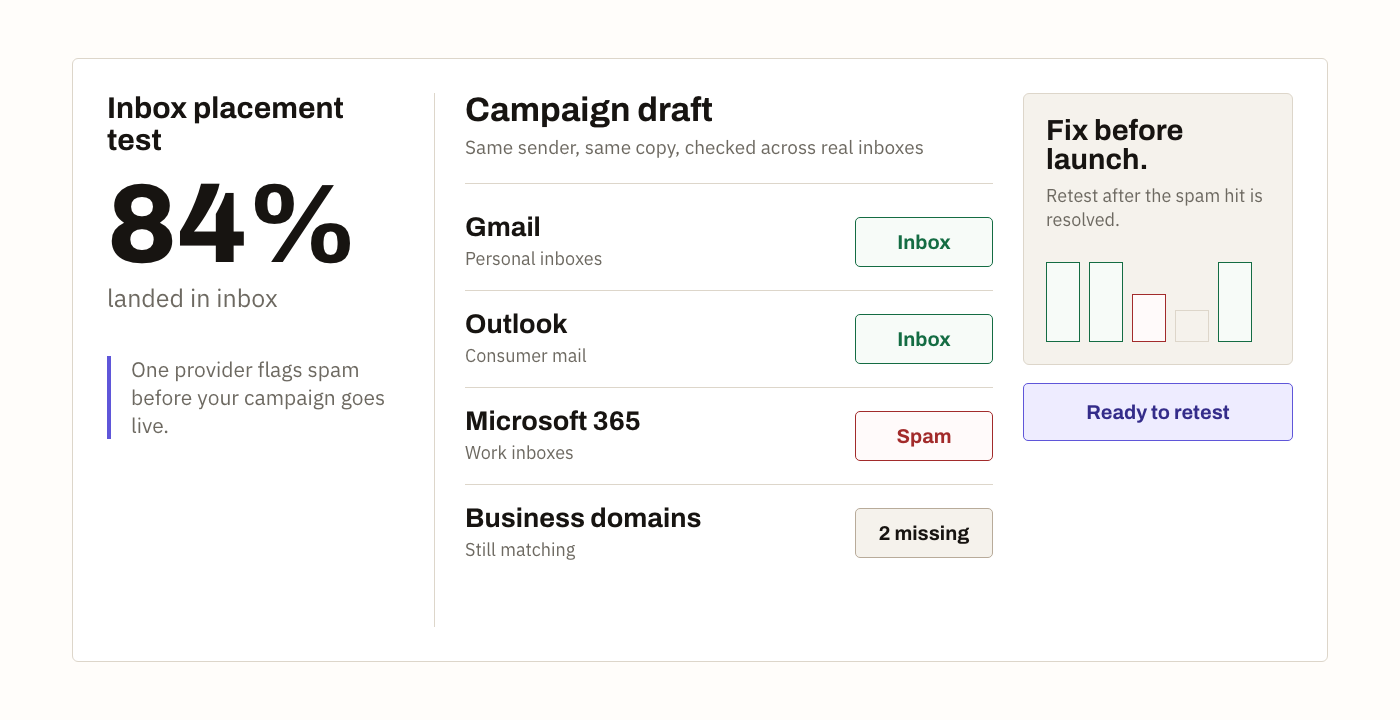
What an inbox placement test checks
The test observes where one production-like message arrived in controlled seed accounts. It keeps provider and account segment visible so a strong Gmail result does not hide weak Outlook or business-inbox placement.
Sendlander reports Inbox, Promotions, Spam, and Missing separately. That is more useful than turning every accepted message into 'delivered' or forcing a delayed result into Spam.
The three-step send flow
Create a test and go straight to the report route while Sendlander reserves the seed recipients and tracking token. Paste every prepared address into the To field, put the exact token in the subject, and send through the ESP, CRM, mailbox, or sequence tool you actually use.
Select 'I've sent it' and watch each seed match. The page remains clear while results are pending and changes to a provider and segment view once the evidence is ready.
How message matching works
Each run receives a unique tracking token and a prepared list of diagnostic recipients. The token lets Sendlander associate observed copies with the correct report without asking you to connect the sending mailbox. You keep control of the send and use the same ESP, CRM, sequence tool, or mail app that will carry the campaign.
Keep the token exactly as shown and send one message to the full list. Changing or removing it can prevent matching. Sendlander protects the underlying seed infrastructure and exposes only the recipient instructions and outcome evidence needed to complete and understand the test.
Provider coverage and timing
The available seed profile covers personal and professional provider accounts shown in the live product. Provider availability can evolve, so the prepared recipient list and result page are the source of truth for the current test.
Some providers arrive more slowly. Pending means the system has not observed the matching copy yet. Wait for a useful matched share before making the launch decision.
Gmail, Outlook, Yahoo, and work accounts are separate samples
Personal Gmail and Outlook.com accounts are useful for consumer-mail behavior. Google Workspace and Microsoft 365 add professional environments where tenant policy and business gateways can change the result. Yahoo and other available consumer providers add another independent view. The live seed list is the source of truth for the exact mix in a run.
Do not treat every seed as an equal slice of your real audience. If sixty percent of your customers use Microsoft-hosted business mail, examine that provider group closely even when it is a smaller part of the test. Placement testing is a diagnostic sample; audience weighting remains a business decision.
How long results take
The report begins listening as soon as you confirm the send. Some inboxes match quickly; others take longer to accept, classify, or expose the message. The waiting state shows how many seed accounts are still being watched instead of filling the screen with meaningless zero-percent bars.
Wait until the matched share is useful before making the launch decision. If results stop arriving, confirm the recipients, tracking token, and sending-platform delivery response. A missing provider group deserves a transport check; one late inbox may simply need more time.
Read the report from outcome to cause
Start with Results ready or Waiting for your email. Then read the matched count and the Inbox, Promotions, Spam, and Waiting totals. Open the seed table to see the exact provider and segment outcomes. Use the Provider and Segment tabs to find a cluster before opening score drivers or deeper diagnostics.
The segmented health band is orientation, not a prediction. A lower score with a clear authentication failure is easier to act on than a middling score with too few matched seeds. Keep the raw outcomes visible while deciding what the number means.
An example launch decision
Suppose every Gmail and Google Workspace seed reaches Inbox, while two Microsoft 365 seeds land in Spam and one Outlook.com seed is still waiting. Do not average that into a comforting percentage and launch. Check Microsoft-specific delivery and reputation evidence, confirm aligned authentication, inspect the final links, and wait for the last result.
After one defensible repair, send the same representative message through the same route and compare Microsoft outcomes. If they improve while Gmail stays stable, the retest supports the change. If everything changes at once, the team gets a new screenshot but not an explanation it can reuse.
Turn the report into a repair
Open seed results and provider distribution to find whether the issue is broad or provider-specific. Fix failed authentication and safety problems first, then reputation, audience, link, and message issues supported by the evidence.
Save or share the report, record the change, and rerun a comparable test. The product is most valuable when it replaces guessing with one controlled before-and-after result.
What to fix first
A production-path authentication failure comes before a copy edit. A compromised account, harmful audience source, sudden unexplained volume change, or relevant sending-asset blocklist also deserves immediate attention. Those issues can affect every message and cannot be repaired with a friendlier subject line.
When the foundation is sound, follow the provider pattern. Compare complaint and delivery evidence, branded tracking domains, link destinations, template structure, sender recognition, and recent cadence. Treat copy warnings as leads rather than forbidden-word rules. Make one change that fits the evidence, then use the retest to decide whether to keep it.
Free tests, credits, and saved history
The free path lets a new sender experience the manual workflow and see the provider result before making a larger commitment. An account keeps reports together, supports sharing and comparison, and uses credits for additional tests. Current pack and monthly-plan prices live on the pricing page so an article never becomes a stale billing promise.
Choose the smallest test that answers the decision. A one-off campaign may need one fresh report. A team changing infrastructure or sending high-value campaigns repeatedly benefits from saved baselines and scheduled monitoring. More tests are useful only when they remain comparable and someone acts on the result.
Limits and privacy
Seed inboxes are diagnostic accounts and do not reproduce every subscriber's history or organization policy. A test reduces uncertainty but cannot guarantee a folder for every recipient.
Active seed details are handled as product infrastructure and should not be published broadly. Shared reports expose the outcome needed for collaboration without turning the system into a public seed directory.
Quick answers.
Why are some results pending?
Some providers receive or classify messages more slowly. Pending means the system has not matched the message yet.
Can I share the report?
Yes. Public reports are shareable, and signed-in users can keep reports in their history.